Sound Kits
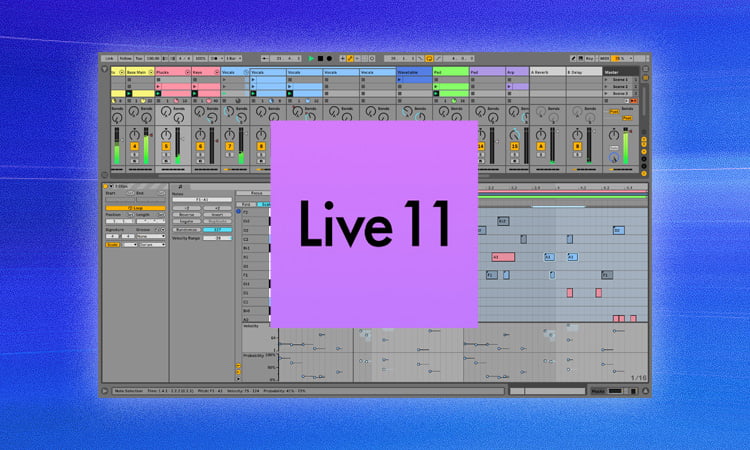
Ableton Live 11 is the latest version of Ableton’s popular digital audio workstation (DAW) software for macOS. With Live 11, Ableton has introduced new features for live performance, music production, and creative workflows.
In this guide, we’ll walk through the full process of downloading, installing, and authorizing Ableton Live 11 on your Mac computer. We’ll cover requirements, installation, authorization, and tips for getting started with Live 11.
Requirements
Before downloading and installing Ableton Live 11, make sure your Mac meets the minimum system requirements:
- OS: macOS 10.13.6 or later
- CPU: Multicore Intel processor
- RAM: 4 GB minimum (8 GB recommended)
- Storage: At least 4 GB free space
You’ll also need an internet connection to download and authorize Live 11.
The latest macOS updates are recommended for optimal performance and compatibility. Live 11 is a 64-bit application so you’ll need a 64-bit capable Mac.
Older Macs may work but are not officially supported. Check Ableton’s website for full system requirements.
Downloading Ableton Live 11
Once you’ve verified your Mac meets the requirements, you can download Ableton Live 11 directly from Ableton’s website:
- Go to Ableton.com/en/live
- Click the “Try Live 11 for free” button
- Fill out the form with your name and email address
- Click the Download button in the confirmation email from Ableton
This will download the Live 11 trial installer as a DMG disk image file. The trial gives you full access to Live 11 for 90 days before requiring an activation code.
Note: The Live 11 trial is a large download around 2.3 GB so make sure you have a stable internet connection.
The download may take a while depending on your internet speeds. Once finished, the DMG file will be in your Downloads folder and ready for installation.
https://www.youtube.com/watch?v=baUN3t-iRAo
Installing Live 11
To install Ableton Live 11 on your Mac, follow these steps:
- Locate the “Live 11 Trial” DMG file in Finder and double click to open it
- Inside the DMG window, double click the Live 11 installer package file
- Follow the onscreen instructions to complete the installation
- Enter your administrator password when prompted
The installer will guide you through the process of copying Live 11 files to your Applications folder. This may take several minutes depending on your Mac’s speed.
Once the installation finishes, you’ll find Live 11 in your Applications folder and can begin using the software.
Authorizing Live 11
When you first open Ableton Live 11, it will prompt you to authorize the software.
There are two authorization options:
- Sign in with your Ableton account (required for trial)
- Enter a serial number (required after purchasing)
For the trial version, click “Sign in” and enter the same Ableton account details you used when downloading.
This will authorize Live 11 to run in trial mode for 90 days. After purchasing the software, you can authorize fully by entering your serial number.
Getting Started with Live 11
Now that Live 11 is installed and authorized on your Mac, here are some tips to get started:
- Watch Ableton’s tutorial videos to learn Live’s workflow and features
- Take a look at the new instruments, effects, and sample packs included with Live 11
- Try out the new Comping workflow for editing multiple takes
- Explore the session view and live looping capabilities
- Add VST plugins for instruments, effects, and sounds
- Record and edit your own audio tracks and MIDI sequences
- And most importantly, be creative and have fun making music!
Live 11 is a powerful DAW so there’s a lot to explore. Don’t hesitate to consult the manual and knowledge base when you need help.
FAQ
Here are answers to some frequently asked questions about downloading Live 11 on Mac:
Does the Live 11 trial work on Apple Silicon M1 Macs?
Yes, Live 11 is fully supported on M1 Macs in native ARM64 mode.
Can I install Live 11 on multiple Macs?
Yes, you can install Live on multiple computers but can only use one at a time with a single license.
What should I do if the download gets interrupted?
Pause then resume the download instead of starting over. The Ableton downloader will automatically resume from where it left off.
Is Live 11 backwards compatible with earlier Live projects?
Mostly yes, but some very old projects may need to be converted on first open. Be sure to backup old projects first.
Does Live 11 work with macOS Ventura?
Yes, Live 11 is compatible with Ventura – just be sure to keep Live updated to the latest version.
What should I do if Live 11 installation fails?
First try restarting your Mac and running the installer again. If issues persist, contact Ableton support for troubleshooting.
Summary
In summary, here is a quick overview of how to download and install Ableton Live 11 on your Mac:
- Check system requirements
- Download the Live 11 trial from Ableton’s website
- Open the DMG file and run the Live 11 installer
- Authorize Live 11 with your Ableton account
- Refer to tutorials and the manual to get started
- Consider purchasing a Live 11 license after the trial
With these steps, you’ll be up and running with Ableton Live 11 on macOS in no time. Ableton offers one of the most unique and inspiring music making experiences on Mac. Download Live 11 today and unleash your creativity!