 Sound Kits
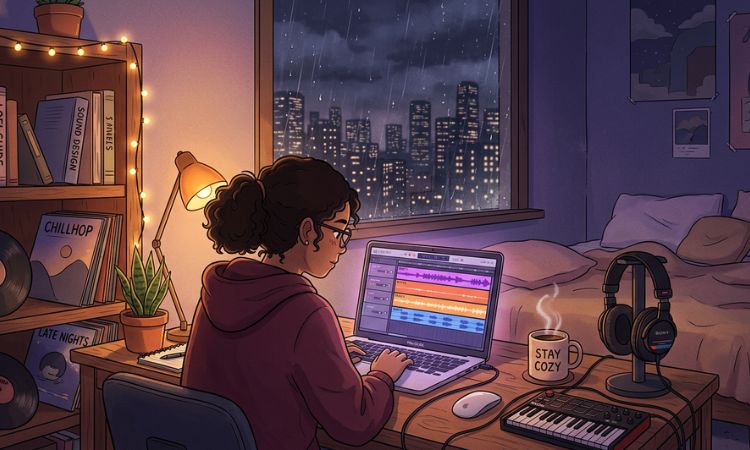
There’s a myth in the lo-fi hip hop world that you need to play an instrument to make good beats. That you need a piano or guitar to create those warm, nostalgic chord progressions that define the genre.
It’s not true.
Some of the most popular lo-fi beats ever made were built entirely from samples, loops, and stock plugins. No live instruments required. If you have a laptop, a DAW, and some quality samples, you have everything you need.
Here’s how to do it from start to finish.
What You Need (And What You Don’t)
What you need:
- A DAW (FL Studio, Ableton Live, Logic Pro X, or even a free option like GarageBand or BandLab)
- A drum kit with lo-fi hip hop sounds (one-shots)
- A collection of melodic loops (piano, guitar, synth, or jazz loops)
- A few free plugins for lo-fi texture (we’ll cover these below)
What you don’t need:
- A MIDI keyboard (helpful but not required — you can draw notes with your mouse)
- A real piano or guitar
- Music theory knowledge (helpful but you can work entirely with loops)
- Expensive plugins
The whole point of lo-fi hip hop is that it celebrates imperfection. The genre was literally built by producers sampling old records on cheap equipment. Working with samples and loops isn’t a shortcut — it’s the tradition.
Step 1: Start With a Melodic Loop
The foundation of most lo-fi beats is a melodic element — usually a piano, guitar, Rhodes, or jazz sample that carries the emotional weight of the track.
If you don’t play any instruments, melodic loops are your best friend. A good loop pack gives you pre-recorded musical phrases that you can drop directly into your project. They’re already played, already recorded, and already have that musical quality you’re looking for.
How to pick the right loop:
Listen for warmth. Lo-fi hip hop melodies tend to feel cozy, nostalgic, and slightly melancholic. Bright, aggressive, or overly complex melodies usually don’t fit the vibe.
Pay attention to the tempo. Most lo-fi beats sit between 70 and 90 BPM. Make sure the loops you choose are either at this tempo or can be time-stretched to fit without sounding unnatural.
Think about simplicity. The best lo-fi melodies are often just two or three chords repeating. You don’t need a complex 16-bar progression — a simple 4-bar loop that creates a mood is more than enough.
Where to find melodic loops:
Our lo-fi drum kits include melodic elements alongside the drum sounds. The MAJESTIC Lo-Fi Hip Hop Drum Kit and DREAMS Lo-Fi Hip Hop Drum Kit are designed specifically for this style. For a wider selection, check out AUTHENTIC Lo-Fi Hip Hop Drum Kit and ChilledCow Lo-Fi Hip Hop Drum Kit.
Step 2: Add Lo-Fi Texture to Your Loop
A clean melodic loop doesn’t sound lo-fi by itself. The magic happens when you process it to sound like it was recorded on a worn-out cassette tape or sampled from a dusty vinyl record.
Here’s how to add that character using free methods:
Vinyl crackle and tape hiss. Download a free vinyl noise sample (there are thousands available online) and layer it quietly underneath your melody. Set it to loop for the entire track. This instantly adds that “playing from a record” feel. You want it to be subtle — if you can clearly hear the crackle over the music, it’s too loud.
RC-20 Retro Color (paid) or iZotope Vinyl (free) are plugins specifically designed to add lo-fi character. iZotope Vinyl simulates the sound of playing music through a turntable — complete with dust, scratches, warp, and mechanical noise. Drop it on your melody channel and experiment with the settings.
Pitch wobble. Real vinyl and tape don’t play at a perfectly stable pitch — they wobble slightly. You can simulate this with a very subtle pitch modulation or chorus effect. In FL Studio, the Pitcher or Fruity Chorus plugins work. In Ableton, use the Chorus-Ensemble effect at low settings. The wobble should be barely noticeable — just enough to make the sound feel alive and imperfect.
Low-pass filter. This is the simplest and most effective lo-fi technique. Add an EQ to your melody and cut everything above 8-10 kHz. Lo-fi music doesn’t have sparkling high frequencies — it sounds warm and muffled, like it’s being heard through a wall. Some producers cut even more aggressively, rolling off above 5-6 kHz for a very dark, hazy tone.
Bit reduction. Reducing the bit depth of your audio simulates the sound of old samplers like the SP-1200 or MPC-60, which are legendary in hip hop production. In FL Studio, use the Fruity Squeeze plugin. In Ableton, use Redux. Set it gently — you want grittiness, not distortion.
Step 3: Program Your Drums
Now for the backbone of your beat. Lo-fi hip hop drums are the opposite of modern trap drums — they’re relaxed, slightly loose, and often feel like someone playing a drum machine by hand rather than programming perfectly quantized patterns.
Loading your drum sounds:
Open your DAW and load individual drum one-shots from your drum kit: kick, snare (or rimshot), hi-hat (closed and open), and optionally a percussive element like a shaker or tambourine.
For lo-fi, you want drum sounds that feel warm and slightly soft. Avoid samples that are too clean, too bright, or too punchy — those belong in trap. Look for sounds with a bit of vinyl texture, tape saturation, or natural room ambience. Our WAKEFULNESS Lo-Fi Hip Hop Drum Kit and GENUINE Lo-Fi Hip Hop Drum Kit are built with exactly this character.
Programming the basic pattern:
Start simple. A classic lo-fi drum pattern looks something like this:
- Kick: Beat 1 and the “and” of beat 2 (or the “and” of beat 3)
- Snare: Beats 2 and 4
- Hi-hat: Eighth notes (every half beat), with occasional 16th-note fills
That’s it. That simple pattern is the foundation of hundreds of popular lo-fi tracks. You don’t need complexity — you need groove.
Adding swing and humanization:
This is where the magic happens. Perfectly quantized drums sound robotic and lifeless in lo-fi hip hop. You need to make them feel human.
Most DAWs have a “swing” or “groove” setting that pushes certain notes slightly off the grid. In FL Studio, you can adjust swing in the Channel Rack or use the “Swing” knob in the pattern settings. In Ableton, apply a groove from the Groove Pool. In Logic, use the Humanize function.
You can also manually nudge individual drum hits slightly early or late in the Piano Roll. Move some hi-hat notes a few ticks ahead or behind the beat. Vary the velocity (how hard each hit plays) so some hits are louder and some are quieter. This creates a natural, imperfect feel that’s essential to lo-fi.
Process your drums:
Apply the same lo-fi processing to your drums that you used on the melody — a touch of vinyl texture, some light saturation, and a gentle low-pass filter. Group all your drums to a single bus and process them together for a cohesive sound. A bit of tape-style compression on the drum bus glues everything together nicely.
Step 4: Add an 808 or Bass Line
Lo-fi hip hop doesn’t always have a prominent bass line, but a subtle low-end element adds warmth and depth.
You have two options:
Option 1: Use a bass loop. If your sample pack includes bass loops, find one in the same key as your melody and layer it in. This is the no-theory-required approach.
Option 2: Use a simple 808 or sub-bass. Load an 808 sample into a sampler and play root notes that follow your chord progression. In most lo-fi beats, the bass just plays single notes that match the chord — nothing fancy. If your melody is in C minor, your bass notes are probably C, Eb, Ab, and Bb. Even if you don’t know theory, you can find the right notes by ear — play different keys until one sounds right with the chord.
Keep the bass subdued. Lo-fi hip hop isn’t about chest-rattling 808s — the bass should fill out the low end without dominating the mix. A warm, round sub-bass with light saturation works better than the aggressive, distorted 808s used in trap.
Step 5: Layer Ambient Textures
This is the secret ingredient that separates a decent lo-fi beat from a great one. Ambient textures create atmosphere and make the listener feel like they’re somewhere specific — a rainy café, a late-night study session, a warm bedroom.
Rain and nature sounds. A gentle rain loop playing quietly underneath your beat instantly creates that cozy, introspective mood. You can find royalty-free rain recordings easily online.
Room tone and foley. The sound of a coffee shop, vinyl static, distant traffic, or a crackling fireplace. These ambient layers should be very quiet — barely audible — but they add a dimension of warmth and texture that makes the beat feel alive.
Ambient pads. A sustained synth pad playing a single chord very quietly in the background adds harmonic depth without adding another melodic element. Use a warm, analog-style pad sound with a slow attack and long release.
Level matters. These texture layers should be mixed low — at least 10-15 dB below your main elements. If someone can clearly hear the rain sound, it’s too loud. It should be felt more than heard.
Step 6: Arrange Your Beat
A lo-fi hip hop beat doesn’t need a complicated arrangement. Most lo-fi tracks follow a minimal structure:
- Intro (4-8 bars): Start with just the melody and ambient textures. Let the listener settle into the mood.
- Verse / Main Section (16-32 bars): Full beat with drums, bass, melody, and textures. This is the core of the track.
- Breakdown (4-8 bars): Pull the drums out and let the melody breathe. Maybe add a vinyl stop effect or filter sweep.
- Return (16-32 bars): Bring the drums back, possibly with a slight variation — an extra percussion layer or a new hi-hat pattern.
- Outro (4-8 bars): Gradually strip elements away and fade out, or end with a vinyl stop effect.
Keep it simple. Lo-fi is about creating a mood and sustaining it — not about surprising the listener with constant changes.
Quick Recap
Here’s the entire process in short:
- Drop in a melodic loop (piano, guitar, or Rhodes)
- Add lo-fi texture: vinyl crackle, low-pass filter, pitch wobble, bit reduction
- Program simple drums with swing and velocity variation
- Add a subtle bass line or 808
- Layer ambient textures (rain, room tone, vinyl noise)
- Arrange into intro → main → breakdown → return → outro
No instruments needed. No music theory required. Just good samples, some processing, and a vibe.
Get Started With the Right Sounds
The quality of your samples makes or breaks a lo-fi beat. Start with a drum kit that’s designed for the genre:
- MAJESTIC Lo-Fi Hip Hop Drum Kit — Warm, textured, premium lo-fi sounds
- DREAMS Lo-Fi Hip Hop Drum Kit — Dreamy, atmospheric percussion
- AUTHENTIC Lo-Fi Hip Hop Drum Kit — Vintage-inspired lo-fi essentials
- WAKEFULNESS Lo-Fi Hip Hop Drum Kit — Chilled, late-night vibes
- GENUINE Lo-Fi Hip Hop Drum Kit — Organic, soulful drum sounds
Or grab PREMIUM to access every lo-fi kit (plus all our trap, phonk, and MIDI packs) in one download.
Want to explore more styles? Read our guide on Phonk vs Drift Phonk vs Memphis Phonk or learn about what makes sample packs royalty-free.












Comments 1